
It used to be that adding your credit card to a mobile wallet like Apple Pay or Google Pay was simple: just key in the details, and verify yourself with an SMS OTP.
Not anymore.
Back in February 2025, the Association of Banks in Singapore (ABS) announced tighter controls to combat so-called “card provisioning scams”, where a victim’s card is fraudulently added to a scammer’s mobile device, then used to make unauthorised transactions.
Since then, banks have been implementing additional hoops to add cards to mobile wallets, which can range from minor inconvenience to big problem if you want to add your card to more than one phone.
In this post, I’ll cover the process for each bank, and highlight the ones where you might encounter issues.
Why would you add your card to a second phone?
But before we even get to that, if you’re not a scammer, why would you need to add your credit card to another phone in the first place?
I can think of several legitimate use cases:
- You’re trying to hit a minimum spend on a card, but can’t spend enough by yourself
- Your family members don’t qualify for cards, or have absolutely no knowledge of the miles game, and you want them to spend on yours instead
- You and your partner want to consolidate all the points you earn into a single account
- You and your partner each have a UOB Lady’s Card and want to utilise each other’s bonus categories
- You have multiple phones or devices that support mobile payments
Sure, some of these issues could be solved by getting a supplementary card, but that entails time and paperwork. Besides, in the case of American Express cards, giving someone a supplementary card actually disqualifies them from future new-to-card welcome offers!
Of course, it’s worth highlighting that adding your credit card to a mobile device that’s not yours is conceptually the same thing as handing over your physical card. You should only be doing this with people whose motives (and competence) you trust completely, because if something goes wrong, you might be liable for any expenses incurred.
Bank-by-bank rundown
Here’s an overview of which banks — or technically card issuers, since there are names like Chocolate here (can’t have a bank run if you’re not a bank!) — support which platforms.
| Bank | Apple | |
 |
✅ | ✅ |
 |
N/A |
|
 |
❌ | ✅ |
 |
❌ | ✅ (MC only) |
 |
✅ | ✅ |
 |
✅ | ✅ |
 |
✅ | ✅ |
 |
✅ | ✅ |
 |
✅ | ✅ |
 |
✅ | ❌ |
 |
✅ | ✅ |
 |
✅ | ✅ |
 |
✅ | ✅ |
 |
✅ (Ex-AMEX) |
✅ (Ex-AMEX) |
 |
✅ | ✅ |
Verified by OTP
When adding cards to a mobile wallet, the following issuers send an OTP to the cardholder’s registered email or mobile number.
- American Express
- Chocolate
- CIMB
- Instarem
- Maribank
- Trust (sent by SMS for Apple Pay, generated in-app for Google Pay)
- YouTrip
Therefore, adding a card to a second phone is really no more difficult than the first.
Verified by OTP (requires prior activation)
The following issuers also verify cardholders via OTP, but as an added security measure, you first need to tweak some settings in the mobile app.
After this, you’ll receive an SMS OTP which you can use to add the card to the second phone.
DBS
To add a card to a mobile wallet, you must first log in to digibank > More > Manage Cards & Loans > Payment Controls > Enable ‘Mobile Wallets’ (this control will be automatically disabled after 10 minutes).
Maybank
To add a card to a mobile wallet, you must first log in to the Maybank2u SG app > Accounts > Cards > Enable SMS OTP.
Verified by website
With UOB, cardholders have the option to “verify on website”, which opens a link to the internet banking portal on the mobile browser. A push notification will be sent to the mobile app on the first phone, and once approved, the card will be provisioned on the second phone.
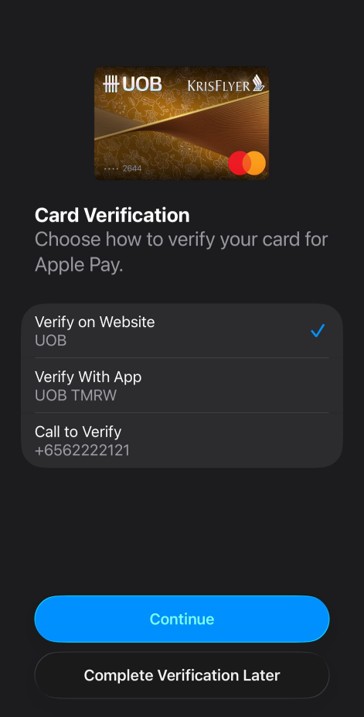
If this doesn’t work, remove the card, add it again, and verify through the website in a single session (i.e. don’t try to verify with app first, then website).
Verified by mobile app
When adding cards to a mobile wallet, the following issuers require cardholders to verify themselves through a push notification to the mobile app.
- Citi
- HSBC
- OCBC
- Standard Chartered
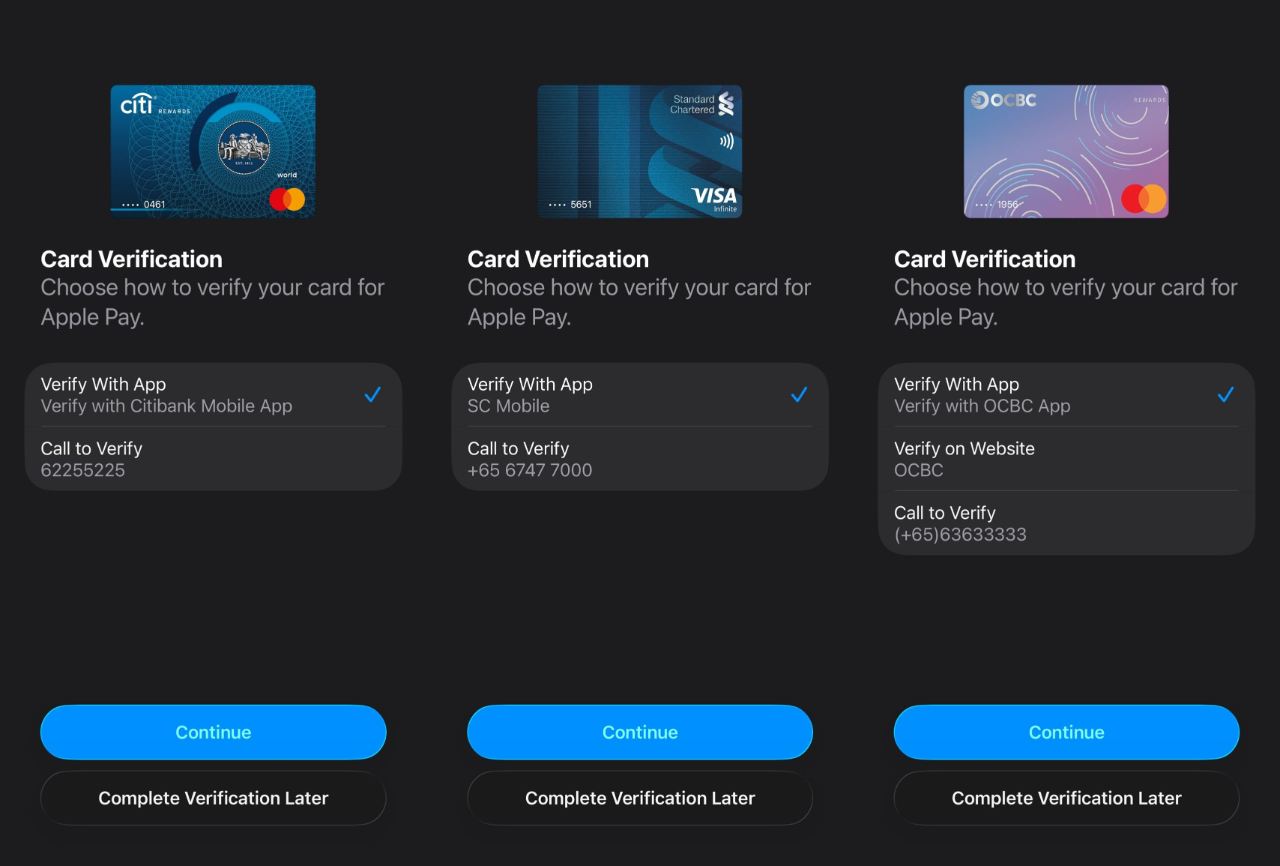
But here’s the problem: the notification will be pushed to the mobile banking app on the second phone. And of course it will fail, because of the mismatch between the account and the card you’re trying to provision.
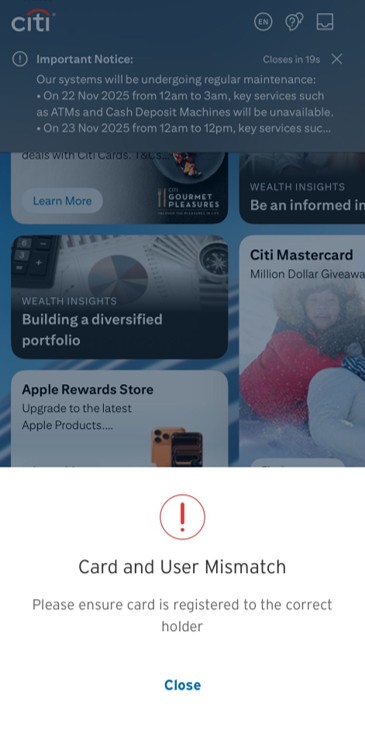
So you can’t actually verify Citi, HSBC, OCBC or Standard Chartered cards through the mobile app, unless you reinstall and bind the security token to the second phone.
Alternatively, you can call up the bank and inform them that you wish to add your card to a mobile wallet (they will be able to see from their side that you have a card pending provisioning). This should be completed within 24 hours.
Conclusion
Adding your credit card to a second phone is still possible, but with the added security measures, it’s not quite as simple as before.
It’s going to be particularly troublesome for Citi, HSBC, OCBC and Standard Chartered cards, where the push notification for verification will be triggered on the second phone. Therefore, you’ll either have to unbind the banking app from the first phone and rebind it with the second (troublesome), or give the bank a call and wait around 24 hours.
Any other experiences adding a card to a second phone or device?








My wife, by accident, removed my UOB card from her Apple Wallet about a week ago. When adding it back, there was no Verify on Website option. It was either verify on the app or call UOB – in other words the behavior was the same as for Citi and the others in that list.
weird. i just did this yesterday and saw the verify on website option
UOB Technology is full of bugs. There is an issue right now where you cannot change your notification limits. Been waiting days for it to be addressed. You lock your card for security, and it causes a whole lot of other things to not work. You get a new card, and you can’t use it until the physical card arrives because the cvv is not available on line. The list of UOB “issues” seems almost endless. What the correct behavior is meant to be when adding your card to an Apple Wallet, goodness only knows!
Nothing weird here… The 3 options you see is because you are using the latest iOS 26.
Others who are still on iOS18+ will only see two options (Verify with App or Call).
The front end is controlled by Apple.
My wife and I had same experience. Only “Verify with App” option available on her iPhone.
We called UOB and were told the only way would be to transfer my UOB token to her phone app, which seemed like too much work at the time.
Same experience here about a month ago. FWIW – same advice, only way is to transfer digital token over and add and remove thereafter with no alternatives.
Well UOB therefore wins the FIRST prize for making things as ridiculously cumbersome as possible. So if I have the UOB App on my phone and my wife has it in her phone, but I want to add my card to her wallet, these are the steps then: Install my App on her phone (and wait 12hrs per security requirement) Add my card to her phones Apple Wallet Install my App back to my phone (and wait 12hrs per security) Install my wife’s App back on her phone (and wait 12hrs per security). And it should be noted that each… Read more »
Just tried adding UOB card to 2nd phone, it asks for verification via “text” which is actually an OTP code generated from the app using the 1st phone. I saw there’s an option of “verify using alternate method” below, but I didn’t choose that and see what option it provides.
For SC you have to phone the bank to add a supplementary card to Apple Pay too. On the two occasions I have gone through this the helpline had to arrange a call back from another team to resolve.
This is because sc supplementary card has the same card number as the principal card! Weird I know