
One longstanding annoyance with Maybank cards in Singapore is the lack of Google Pay support. While Apple and Samsung users have long been able to tap their phones to pay, Android users still have to lug around the physical card — all 5 grams of it!
Maybank added support for Google Pay in Malaysia in May 2024, but it’s been a long, arduous wait for us across the causeway. Thankfully, that ends now.
Maybank cards add support for Google Pay
Maybank cardholders can finally add their Maybank credit and debit cards to Google Pay.
Google Pay is a fast, secure and contactless way to pay in-stores, online and in your favourite apps. Add your Maybank Credit and Debit Cards to Google Wallet and pay seamlessly with your Android phone and Wear OS devices.
Most importantly, you still get all your Maybank Cards’ rewards and benefits.
-Maybank
Before you add your Maybank card to Google Pay, you’ll need to temporarily enable SMS OTPs via the M2U SG app.
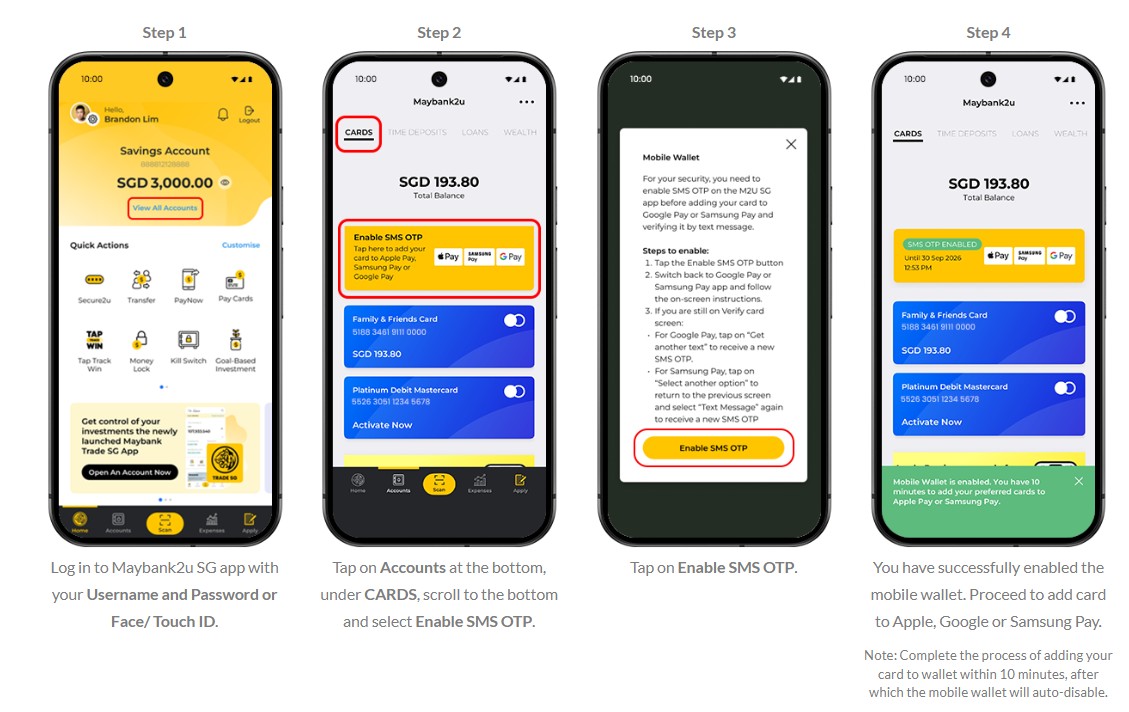
- Update your M2U SG app to the latest version
- Log in to the M2U SG app and tap on Accounts > Cards > Enable SMS OTP
- Tap Enable SMS OTP on the pop-up
You will then have a 10-minute window to add your card to Google Pay (or Apple/Samsung Pay) as per normal. I was able to do this for all my cards, both Visa and Mastercard.
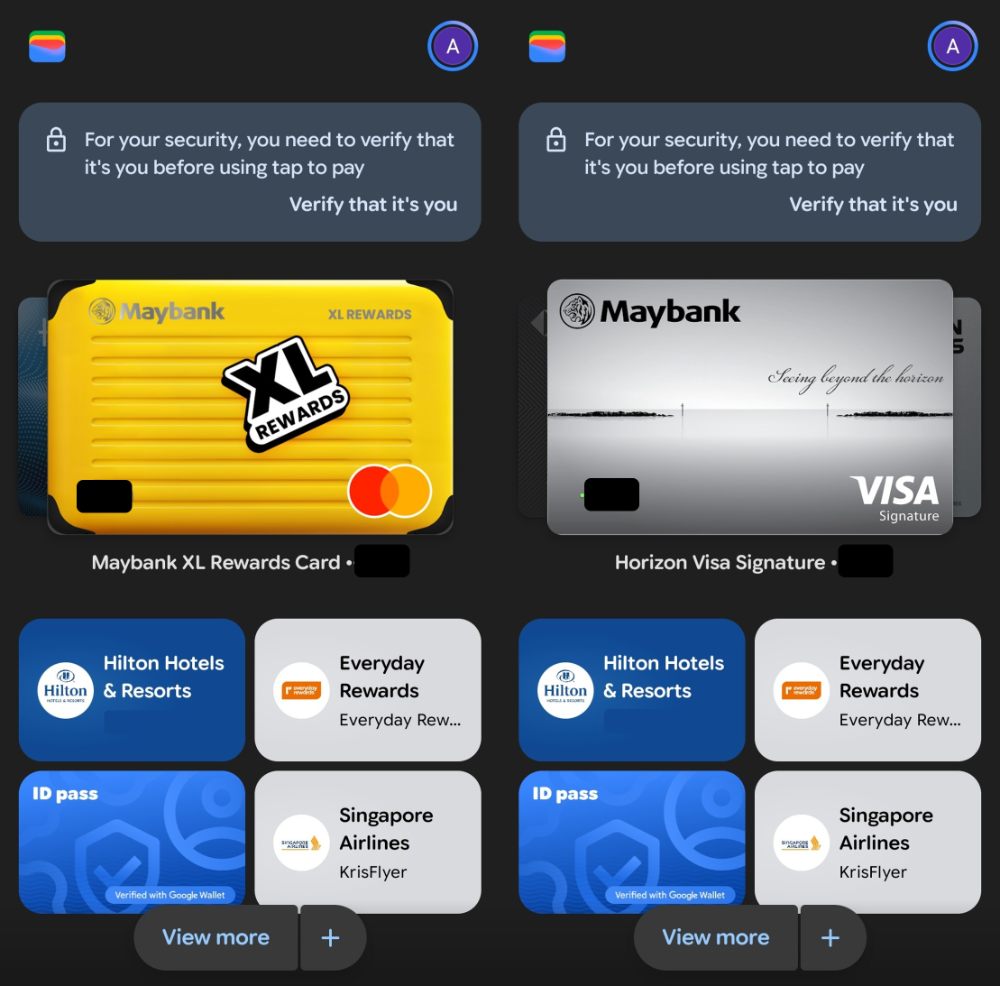
Maybank has yet to be added to Google Pay’s official list of supported card issuers, but I assume that will change shortly.
Why this matters
The most obvious benefit of Google Pay support is convenience — it means one less card to carry around, or lose.
But Google Pay support also makes it easier to “share” your card (with someone you trust unequivocally, of course). For example, suppose you’re on holiday with your spouse and want to split up to do some shopping. One of you can take the physical card, while the other uses the digitised version. You could obviously achieve the same thing with a supplementary card arrangement, but not everyone can be bothered to fill in the paperwork.

It also matters if you’re a Kris+ user, as Kris+ payments can only be made with Apple Pay or Google Pay. Android users can now use the Maybank XL Rewards Card to earn 4 mpd at Kris+ merchants in the dining, shopping, entertainment and travel categories, as defined below.
 Maybank XL Rewards Card Maybank XL Rewards Card |
|
| Category | Eligible MCCs |
| Dining | 5462, 5811, 5812, 5814 |
| Shopping | 5262, 5310, 5311, 5331, 5399, 5621, 5631, 5651, 5655, 5661, 5691, 5699, 5941 |
| Entertainment | 4899, 5813, 5815, 7832, 7993, 7994 |
| Travel | 3000-3299, 3300-3308, 4511, 4722, 7011 |
To pre-empt a common question, yes, you will earn the same rewards regardless of whether you pay with the physical card, or the digitised version on your mobile wallet. It all boils down to the MCC.
Conclusion
At long last, Maybank has added support for Google Pay in Singapore, allowing Android phone and watch users to make in-store payments with their devices, instead of the physical card.
Beyond the convenience, the big win is for Android-toting Kris+ users, who can now use the Maybank XL Rewards Card with Kris+ to earn 4 mpd at participating merchants.

Turn up the music, turn down the lights
I got a feelin’ I’m gon’ be alright
Okay, alright
It’s about damn time
Android users rejoice!