
Earlier this week, I wrote about how Amaze appears to be throttling the speed at which declined transactions appear on the Instarem app. In my tests, it took up to 15 minutes for declined transactions to appear, which severely limits its usefulness for checking MCCs on the go.
But fortunately, there’s an alternative. As it turns out, Trust Bank cards show the MCCs for declined transactions pretty much instantly.
Checking MCCs with Trust cards
You can check the MCC of a merchant by putting a temporary block on your Trust credit or debit card, attempting the transaction, then checking the app for the declined transaction details.
To do this, open the Trust app, tap on View Cards > Lock Card. After this, attempt the transaction, whether online or in-person. Once it fails, look for the Activity section, tap View All, then tap on the transaction you just attempted.
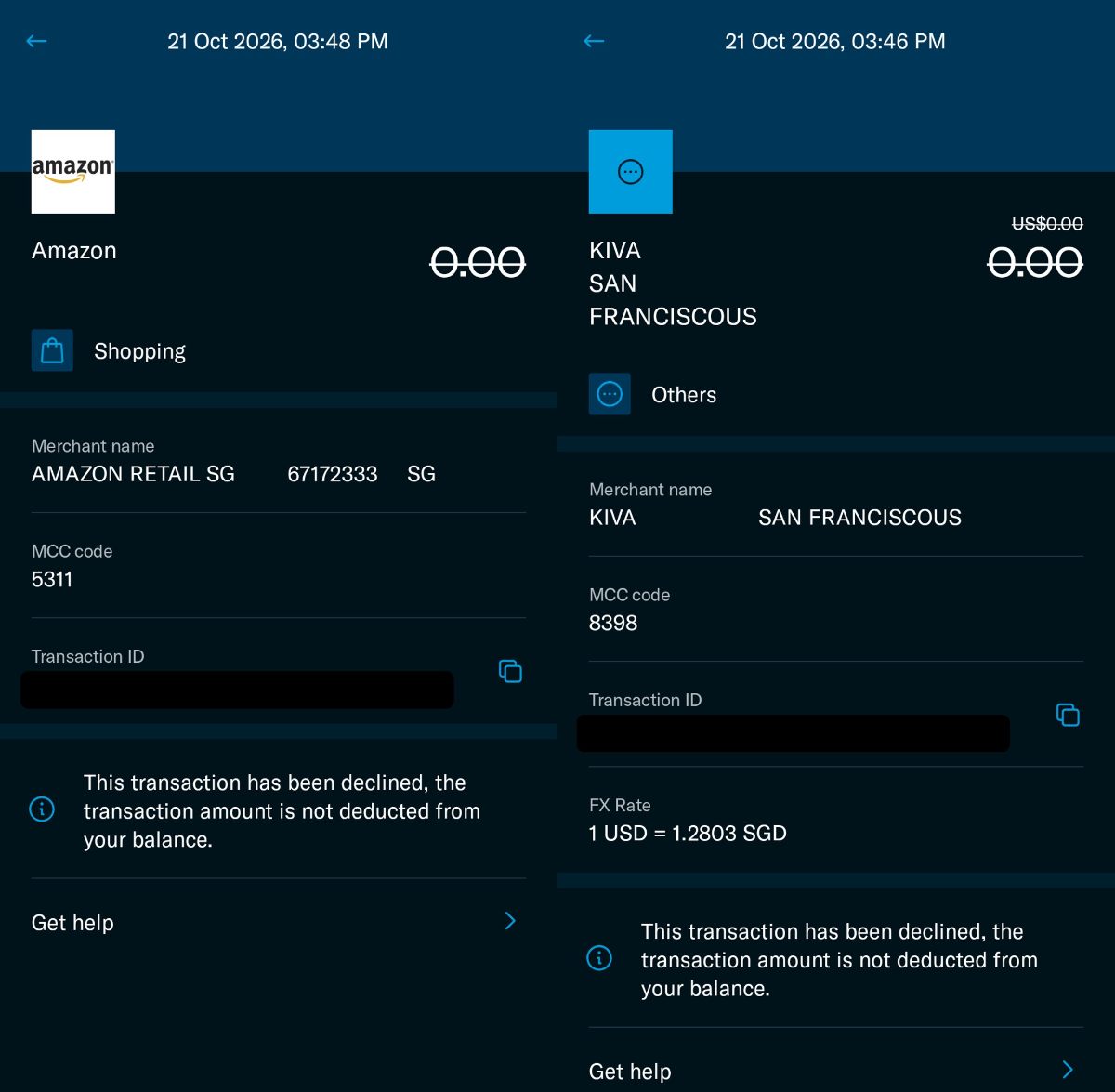
You’ll see the merchant name and MCC code listed. It’s as simple as that!
 Trust Freedom Card Trust Freedom Card |
|||
| Apply via app with referral code 2GQEAM81 |
This should be particularly useful if you’re accumulating spend for the Trust Freedom Card’s 100,000 miles welcome offer, which excludes the following.
|
The ones you really need to be careful about here are MCCs 7299, 7399 and 8999. We know these are used by CardUp and Points.com, but they can frequently pop up in unexpected places like Shopee.
| MCC | Description | Examples |
| 7299 | Personal Services Not Elsewhere Classified |
|
| 7399 | Business Services Not Elsewhere Classified |
|
| 8999 | Professional Services Not Elsewhere Classified |
|
When in doubt, put a temporary block on your Trust Freedom Card, make sure the merchant doesn’t have a “forbidden MCC”, then unblock your card and charge it.
Two caveats
While checking MCCs with a blocked Trust card is simple enough, there are two things you want to be aware of.
Visa Provisioning Service
When I was attempting transactions with a blocked Trust card on Giving.sg and AXS, both showed up as MCC 6012, Visa Provisioning Service.
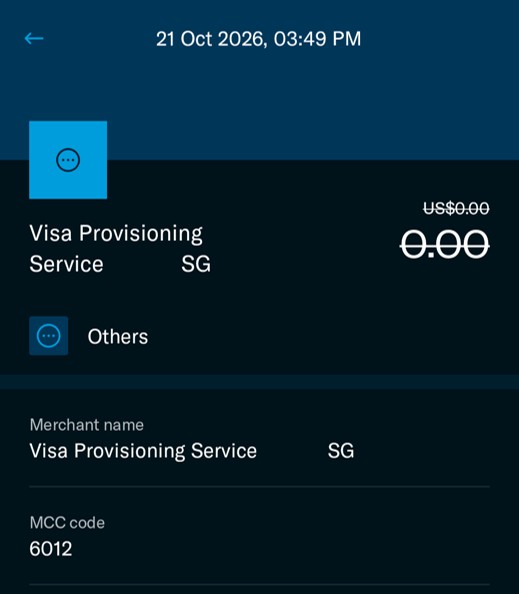
Obviously, that’s not the correct MCC. What’s probably going on is that Visa is first trying to authenticate the card before the actual transaction takes place, but the process fails since it’s blocked. I know this must happen in the background all the time, but it’s the first time I’ve seen it appear under a card’s recent activity.
If it’s any consolation, this only affects online transactions, where Amaze’s delay will be less of an issue (there’s no line to hold up). Alternatively, you can check such merchants through the DBS digibot method.
Visa and Mastercard may have different MCCs
Trust only issues Visa cards at the moment.
But if you plan to make the actual transaction with a Mastercard, you should know that Visa and Mastercard may occasionally use a different MCC for the same merchant. It’s rare, but it can happen. For example, a GrabUnlimited subscription codes as MCC 5812 (Restaurants) on Visa, and MCC 4121 (Taxicabs) on Mastercard.
If there’s absolutely no room for error, then you should do your testing with a card on the same network. You can check Mastercard MCCs with Amaze, or through the DBS digibot with any DBS Mastercard.
Other ways of checking MCCs
Here’s a quick recap of the four ways of checking MCCs in Singapore, following the addition of the Trust Card.
| Method | Ease of Use | Reliability |
| ❓HeyMax | ●●● | ● |
| 💳 Trust Card | ●● | ●● |
| 📱 Instarem App | ●● Up to 15-min delay |
●● |
| 🤖 DBS digibot | ● |
●●● |
| Note: “Ease of use” and “reliability” are all relative. HeyMax already provides a solid baseline for reliability, and the DBS digibot is still simple enough to use, despite requiring more steps than the other two methods. | ||
Conclusion
With Amaze’s declined transactions now taking up to 15 minutes to appear, a blocked Trust card is the quickest way to check MCCs on the spot. It’s free, it works for both online (well, mostly) and in-person transactions, and the result shows up in the app almost immediately.
Just remember that some online merchants may show up as Visa Provisioning Service instead of their actual MCC, and if you’re paying with a Mastercard, the MCC could occasionally be different.

If you block the card, it is not accessible via apple pay. Physical card is fine.