
| Note: This story has been updated with clarifications from Instarem, who have confirmed that MCCs are still displayed for declined card-linked transactions. |
One of the quickest ways of checking MCCs is through the Amaze Card.
By making an unsuccessful transaction, either with a blocked card or an insufficient wallet balance, you can verify the MCC on the Instarem app, then repeat the transaction using the optimal card for the situation.
Last month, however, reports started coming in that MCC details on declined transactions were no longer available for some users, leading to speculation that Instarem might be removing this feature altogether.
I’ve now managed to get some clarity on the situation, and it’s good news. You can still use Amaze to check MCC — you just have to do it a different way.
Changes to checking MCCs with Amaze

Instarem has clarified that following a recent app update, MCC details will no longer be displayed for unsuccessful wallet-linked transactions.
|
“MCC details are still visible for every successful transaction, but they are no longer displayed specifically for declined wallet transactions. This is part of a new app version which is being rolled out progressively, and some users may still see the previous experience for a short period. The experience will become consistent for all users as the rollout is completed. Since a declined transaction is not completed, the merchant information received may be incomplete or inconsistent. We therefore updated the experience, so customers only see MCC details for successfully processed payments. To be clear, customers can still see MCC on linked card transactions (declined included).” -Instarem spokesperson |
This distinction is crucial. You will still be able to see MCCs for declined card-linked transactions, as well as all successful transactions, regardless of funding source.
| Card-linked | Wallet-linked | |
| Successful | Shows MCC | Shows MCC |
| Declined | Shows MCC | No MCC |
Below is an illustration of what you’ll see for a declined wallet transaction (LHS), compared to a declined card-linked transaction (RHS). I also went to check the unsuccessful reports from the past month, and indeed, the users were attempting to transact with a wallet-linked Amaze.
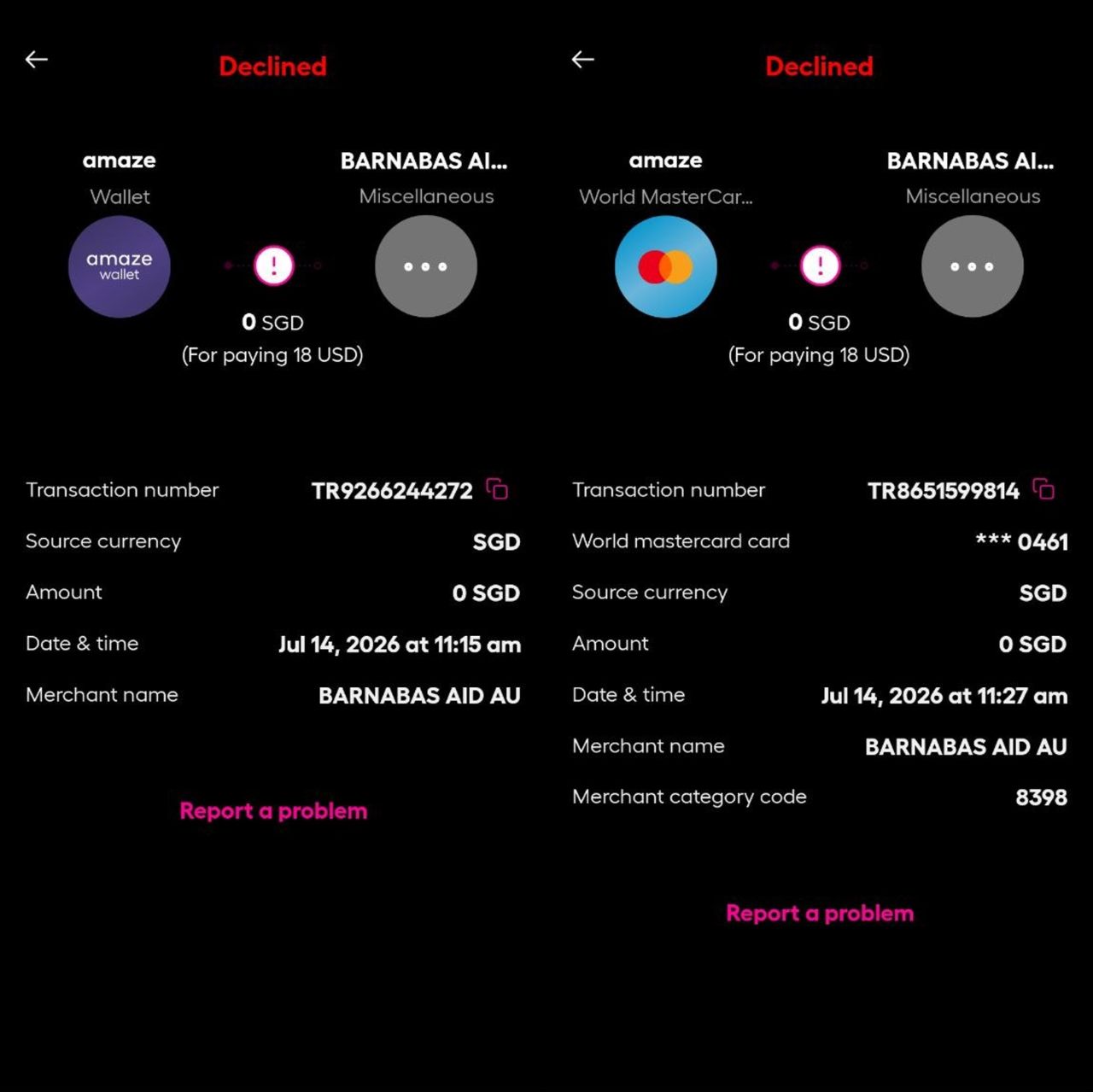
tl;dr: you can still use Amaze to check MCCs. You just need to pair it with a credit or debit card, then disable the various permissions under Card > Manage (I normally turn them all off just to be safe).
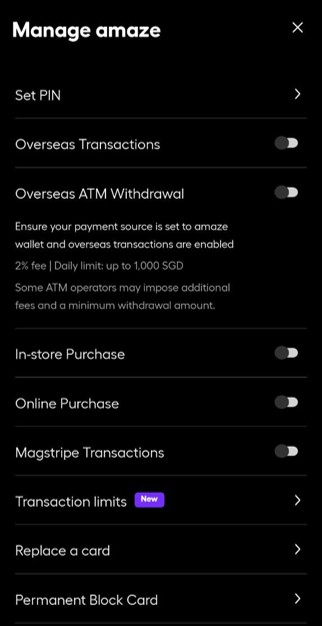
After that, proceed to attempt a transaction, either in-store or online. The transaction will fail, and you’ll be able to check the MCC and then proceed as necessary.
What are the alternative ways of checking MCCs?
While it’s a relief to know that Instarem has not nerfed this useful feature, it’s still good to know about the alternatives, should that day ever come — declined transactions still incur expenses for card issuers (to cover the cost of communication technology and fraud checks), and too many declined transactions add up eventually.
DBS digibot method
DBS cardholders can place a temporary block on a credit card and attempt to make a transaction. After this, they can use the digibot to list their declined transactions, which will appear along with the MCC.
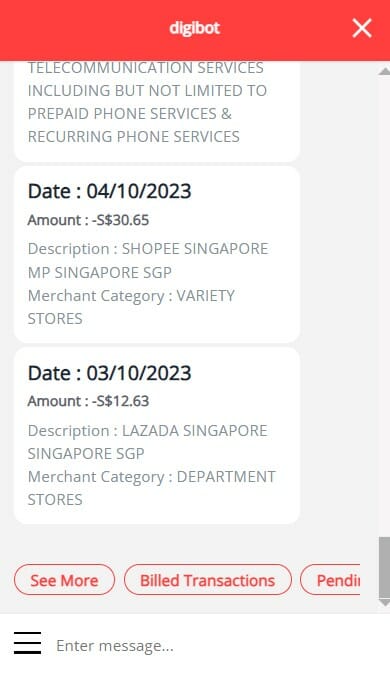
Technically, the MCC description is provided rather than the four-digit code (e.g. Department Stores instead of MCC 5311), but this is specific enough for you to find the answer with a quick Google, or by referring to this file.
The downside of this method is that it takes significantly longer, as you’ll need to navigate through numerous menu options before you can obtain the MCC. It’s definitely not the kind of thing you want to be doing while holding up the line!
HeyMax
HeyMax allows users to search for the MCC of many popular merchants, and also recommends what cards you can use to pay.
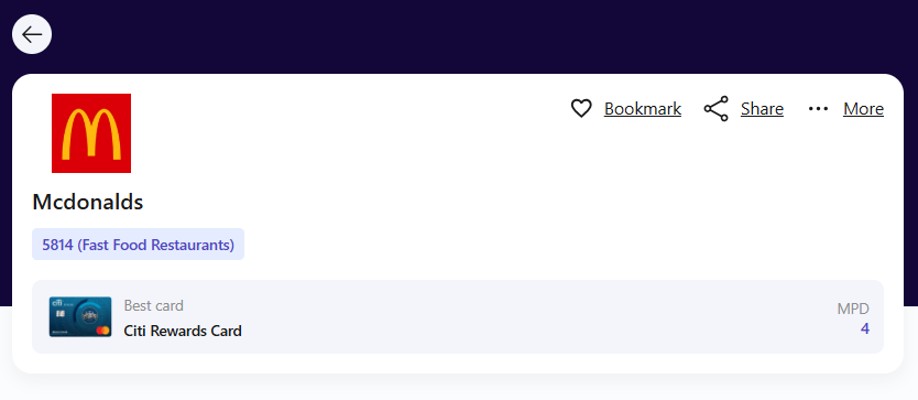
For the most comprehensive results, you’ll need to manually change the search method to “Visa search”, which uses Visa’s API to find a merchant rather than just referring to HeyMax’s database.
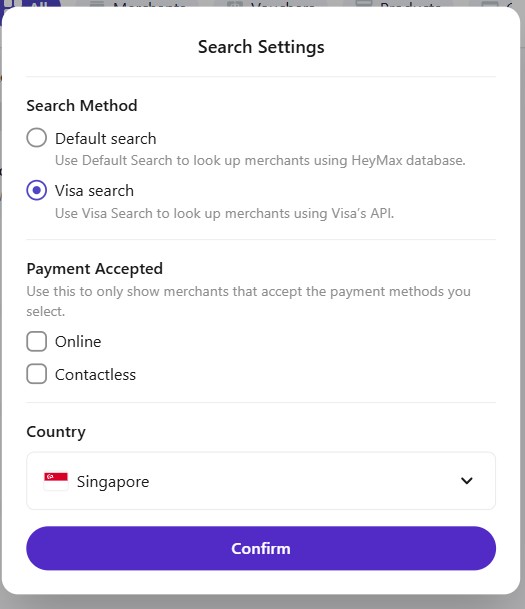
The problem with the HeyMax method is that sometimes, the registered business name of a merchant may not match its public-facing name (most famously with pornographic websites, to prevent spousal discovery).
Moreover, some merchants — particularly ecommerce platforms — process transactions under a range of MCCs. Therefore, it’s impossible to discover the actual MCC without attempting a transaction — something that the HeyMax lookup tool doesn’t allow for.
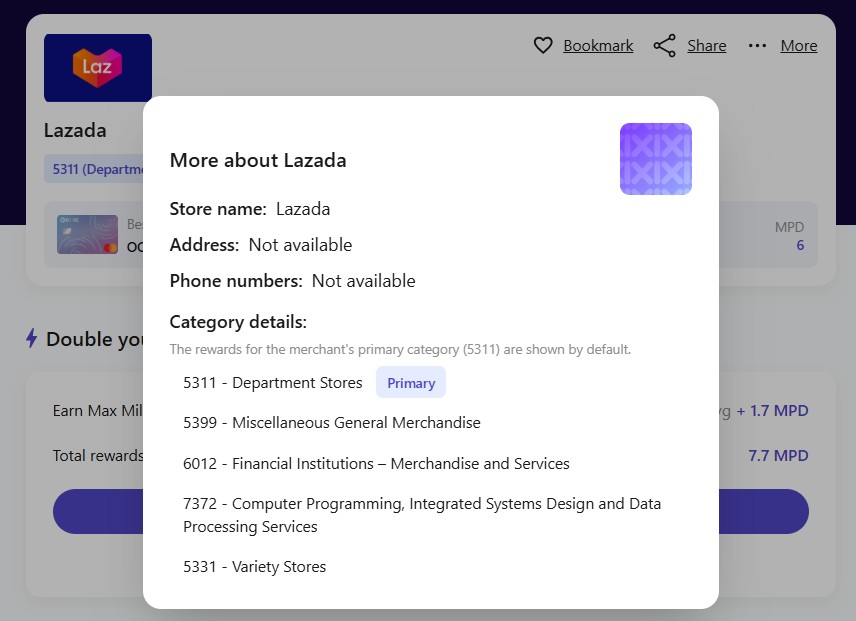
I tend to use HeyMax as a “quick and dirty” reference guide, when time is of the essence and the amount in question is relatively small. I certainly wouldn’t chance it with any kind of big-ticket purchase, and neither should you.
Conclusion
There were concerns that Amaze no longer displays MCCs for declined transactions, but it’s now been clarified that this only happens when you link Amaze to a wallet. Linking Amaze to a credit or debit card still allows you to check MCCs, without actually spending.
Amaze is probably the best tool for checking MCCs at the moment, striking the right balance between speed and reliability. Let’s hope that continues!

Unpopular opinion: abusing a free “hack” and imposing business costs on a vendor without even giving them eventual business (by using a non-Amaze card to eventually pay) to check whether a $10 F&B txn is 5814 or not, one should not be sad that this loophole is eventually closed
It should not be a “hack” in the first place though, should it. The real issue here is that banks use a non-transparent method to award miles that leaves everyone guessing about how a particular transaction will be processed. This is not right, nor fair. If banks did the right thing and enabled people to know how a transaction will be processed, then there would not need to be a “hack” to find out what should be available and transparent in the first place.
100% agree. There should be a far easier way to know of a merchant’s MCC since a lot of the rewards are MCC-based and one could lose out a lot of value using the wrong card for a particular MCC.
Right now, I rely on DBS failed transaction hack to find the MCC code. It’s very useful if you have time. But if you are at the counter, it can be stressful navigating the various screens to see the MCC code. Now I just enter what MCC i know into https://check-mcc.sg/ or the mobile app to update the database and then use it as MCC reference. Shameless plug, I created the website and mobile app
For offline/contactless transactions, another method I use is to ask the cashier to split the transaction into $5 and the balance. I will first use UOB PV for to pay the $5 and get the 4mpd. This transaction will then be posted on my Heymax Card Tracker, where the MCC will be listed and decide which card to use for the balance. Not the most ideal as Heymax will sometimes lag and post only a few hours or even days later, but still quite accurate.
According to support “MCC codes are only visible for the approved transactions”
I used to do the failed Amaze linked to credit/ debit card transaction hack to check MCC, but even though I disabled all options, the transaction still somehow got through at a cafe and I had to pay the 50cents charged by Amaze for local transaction. I complained on telegram milelion chat and was taught to link Amaze to wallet with insufficient balance instead. Now I have to revert to the card-linked method again, and risk the charge somehow slipping through again.
Who cares about the banks incurring extra costs for declined transactions. If they “got off their back-sides” and did the right thing by being transparent and providing a proper way to know the MCC, the declined transaction route would not be necessary. I hope their costs for declines transactions are noticeably high – maybe that will encourage them to do the right thing over this?
I noticed that in my 2 attempts to get a declined transactions in the last 7 days, the first notification did not arrive till 1-2 days later, and the other one done yesterday did not show up (yet?). Looks like they are still providing the details, but just not instantly which kinda renders this whole process redundant… Anyone has a similar experience?
mine were almost instant, though i have heard reports like yours
i just encountered this myself at a restaurant- made a failed trxn and nothing showed up in the app until a day later. maybe there is a difference between in person and online spend
[…] to MileLion for uncovering the updated method to check MCCs with […]