
HSBC Singapore has just made a quiet update to its banking app, which allows cardholders to check Merchant Category Codes (MCCs) for completed transactions.
This is a crucial piece of information, since MCCs are often used to determine whether bonus points are awarded, or whether any points are earned at all. And yet, most banks tend to obfuscate it, forcing customers to resort to third-party tools or unofficial workarounds.
HSBC Singapore app now shows MCCs

HSBC cardholders can now check the MCCs of completed transactions via the HSBC Singapore app.
To do this, log in to the app, tap on your card, scroll down to Latest Transactions and tap on any completed transaction. If required, you can match the MCC with the document here to get the full description.
Apologies for the ghetto screenshots, but HSBC doesn’t allow Android users to take screenshots within the app, because you’re an idiot and can’t be trusted to protect yourself, and because unauthorised screenshots will destroy the space-time continuum and bring about Ragnarök.
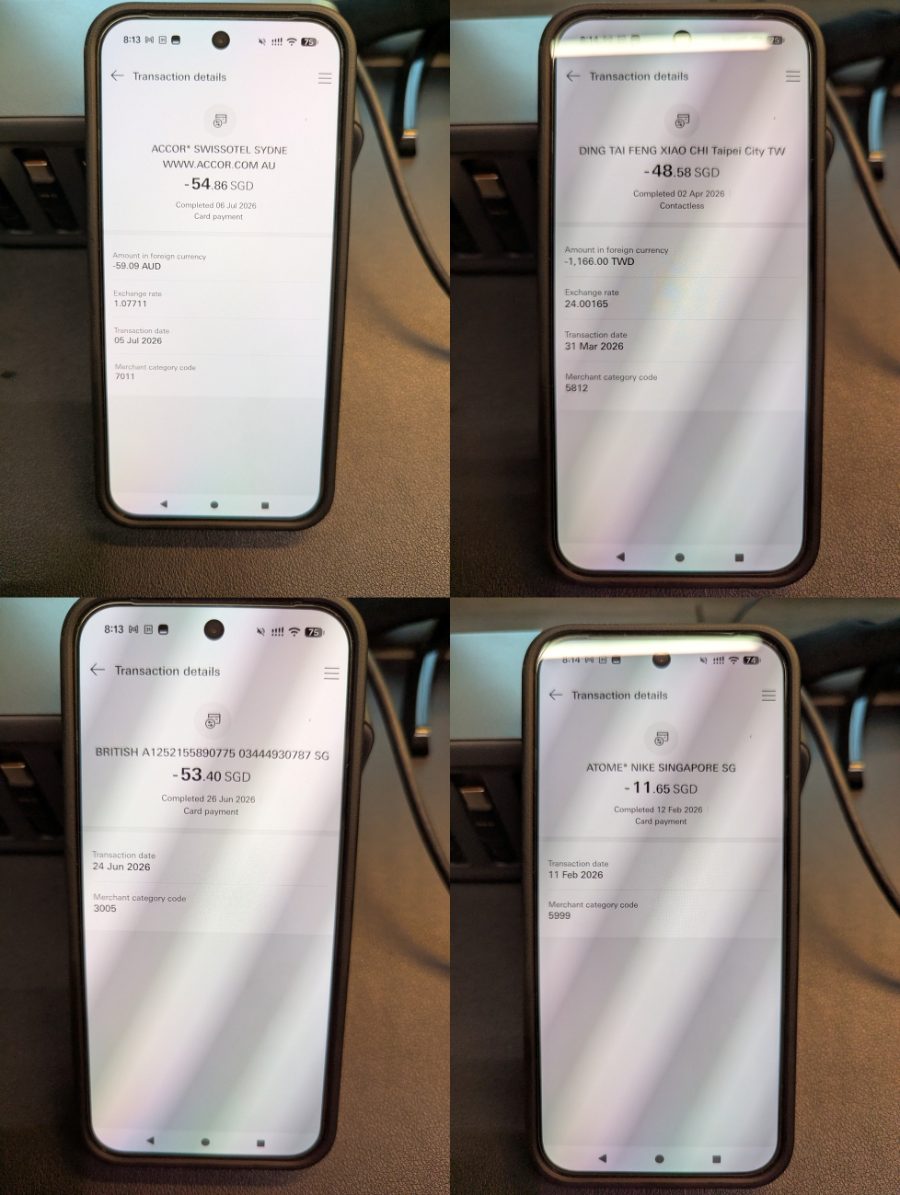
MCCs are available even for historical transactions which were made before this feature was added.
However, do note that MCCs will not be shown for pending transactions. You’ll need to wait for the transaction to post before you can check the MCC. The posting time varies by merchant, but is usually completed within 1-3 days (there are outliers, however, and my personal record is two weeks).
Unfortunately, HSBC does not show declined transactions on its internet banking, which rules out the possibility of checking MCCs with a blocked card, as you can with DBS (see below).
HSBC Revolution & MCC roulette
Checking MCCs is particularly important for the HSBC Revolution, whose bonus whitelist has some unexpected omissions that can catch cardholders unawares.
For example, while Travel is included as a bonus category, it does not include MCC 4722 (Travel Agencies) or MCC 7512 (Car Rental Agencies).
| MCC | Examples (non-exhaustive) |
| 4722 Travel Agencies |
Airbnb, Agoda, Klook, Pelago, Traveloka, Trip.com |
| 7512 Car Rental Agencies (Not Elsewhere Classified) |
Smaller rental car agencies like Astra, Burswood, Centauro, Omega Car Rentals |
Likewise, while Dining is a bonus category, it does not include MCC 5499 (Misc. Food Stores) or MCC 5814 (Fast Food).
| MCC | Examples (non-exhaustive) |
| 5499 Misc. Food Stores |
7-Eleven, Bee Cheng Hiang, Family Mart, Famous Amos |
| 5814 Fast Food |
Burger King, foodpanda, GrabFood, KFC, McDonald’s |
Because Visa and Mastercard have historically offered preferential fees for fast food (a practice which will end in September 2026), many full-service restaurants have attempted to game the system by getting a 5814 classification. This results in the MCC popping up in unexpected places, like Beyond the Dough, Cafe Nesuto, PS Cafe, Shin Katsu, and Tipo Pasta.
What about checking MCCs before spending?
If you want to check the MCC before making an actual transaction, you’ll need to use one of the three methods below.
| Method | Ease of Use | Reliability |
| ❓HeyMax | ●●● | ● |
| 📱 Amaze Card | ●● | ●● |
| 🤖 DBS digibot | ● |
●●● |
| Note: “Ease of use” and “reliability” are all relative. HeyMax already provides a solid baseline for reliability, and the DBS digibot is still simple enough to use, despite requiring more steps than the other two methods. | ||
The method that strikes the best balance between ease of use and reliability is the Amaze Card. Be sure to pair Amaze with a card before attempting a transaction, as unsuccessful wallet-linked transactions no longer display MCCs.
Conclusion
HSBC cardholders can now check MCCs via the HSBC Singapore app, though it’s only possible for completed transactions. If you want to ascertain the MCC before spending, you’ll still have to use HeyMax, the Amaze Card or the DBS digibot.
Still, it’s good to see a bank adding a little more transparency to the rewards process. Hopefully we’ll see more follow suit.

I believe the codes are not entirely accurate. A lot of the dining transactions are coded as 5814 but appears as 5812 on amaze
could it be a visa/mastercard thing?
If that is the case, then it seems to be very risky to even consider using hsbc revolution for dining since visa usage coded a lot of normal restaurants as 5814
“Standard Chartered supplementary credit cards have exactly the same card number, expiry date and CVV as the principal card. Therefore, once the principal cardmember has redeemed the benefit, supplementary cardmembers may not be able to redeem it (and vice versa).
Yeah, it’s dumb.”
Sounds like a proper and well executed cost management strategy to me 😁