
Tracking credit card points can be a headache, but thankfully, most banks in Singapore now allow cardholders to view their earnings down to a transaction-level basis.
This is particularly important when you’re using a specialised spending card like the UOB Preferred Platinum Visa. How do you know a given transaction really earned the points it should? Without a breakdown, you’re going to have to trust that the bank’s systems are properly capturing and crediting bonus points, or call them up and waste time manually going through transactions over the phone.
In this post, I’ll explain how to check points breakdowns with various card issuers in Singapore.
| 💳 Credit Card FAQs |
| Managing Points |
| Conversions |
| Calculations |
Which banks offer points breakdowns?
The following banks offer points breakdowns either through their internet banking portals, or apps.
- American Express
- DBS
- HSBC
- OCBC
- Standard Chartered
- UOB
The following banks only offer aggregated points balances. If you want a breakdown, your only option is to call up the bank and chat with a CSO.
- Bank of China
- Citibank
- Maybank
I want to highlight Citibank in particular, because up till February 2024, it was possible to use the Citi ThankYou Rewards Portal to view points breakdowns. It wasn’t perfect in the sense that points were presented by day instead of by transaction, but with a little bit of back calculations you could generally get the answer you needed.
Unfortunately, the portal has been retired, and Citi has yet to add similar functionality to its app.
When should my points be in?
If you don’t see your points, don’t panic yet.
With certain cards, only base points are posted with the transaction. The bonus points may only be credited at the end of the following month (or, in the case of the KrisFlyer UOB Credit Card, the end of the membership year!) in a separate lump sum.
For a card-by-card rundown of what points post when, refer to the guide below.
American Express
Membership Rewards & HighFlyer points
(1) Log in to your AMEX account
(2) Select the card you wish to view in the top right hand corner
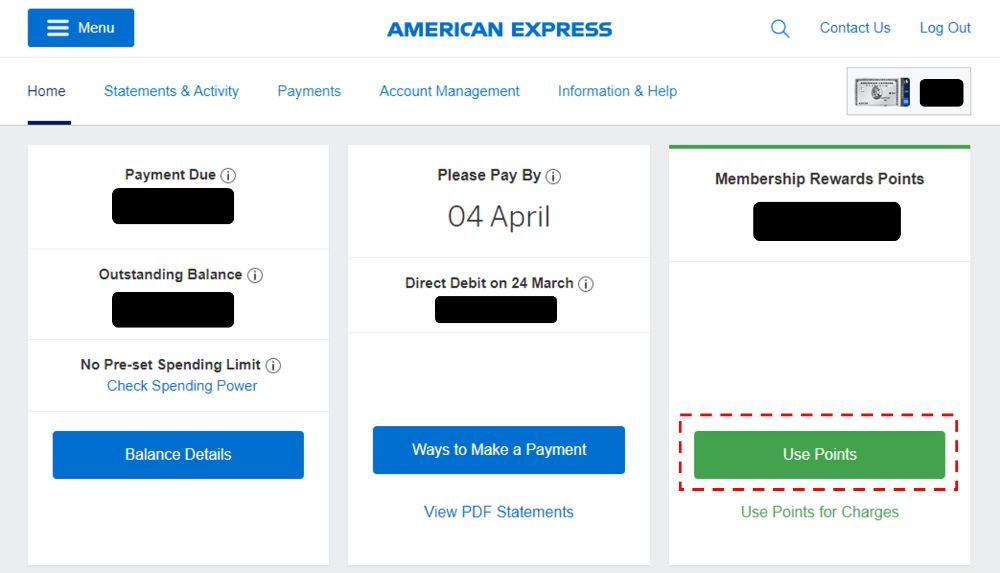
(3) Click on “Use Points”
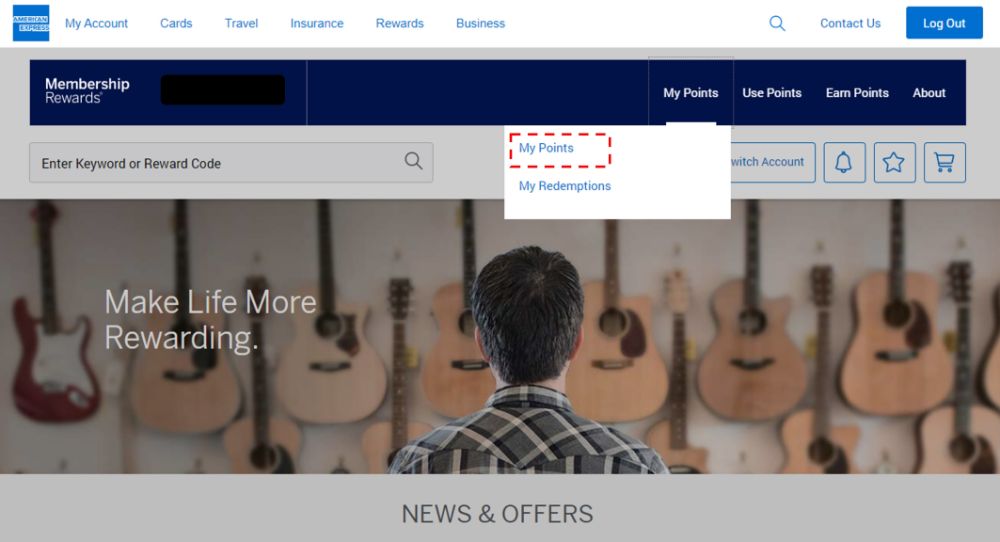
(4) Click on “My Points”
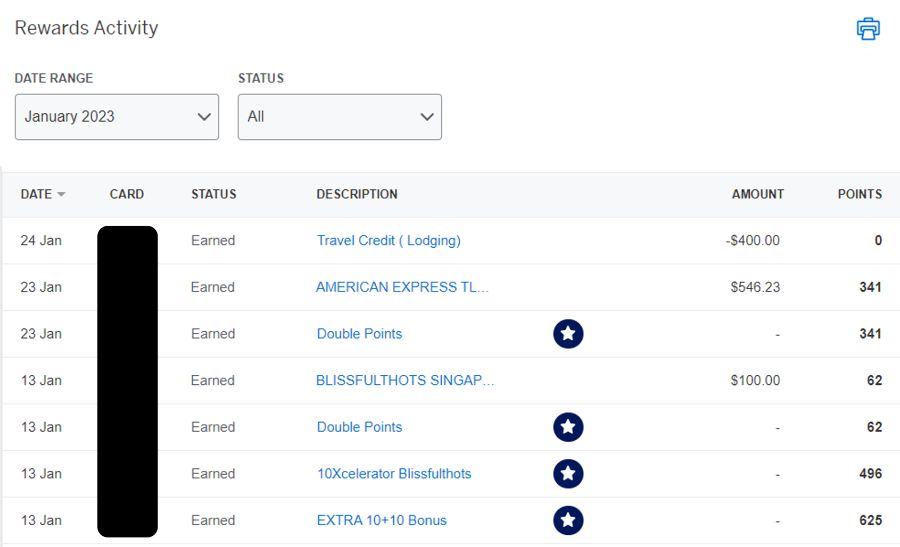
(5) Use the drop down menu on the left to see different time periods. Breakdowns can be viewed for the past 12 months.
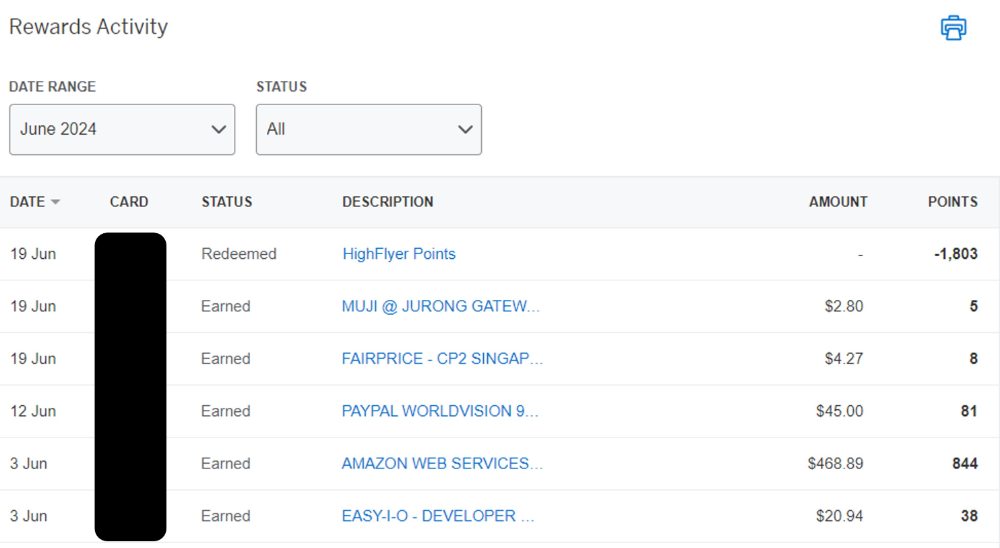
You can toggle to a different card in the top right hand corner to check breakdowns for your other cards too, provided they earn Membership Rewards or HighFlyer points.
KrisFlyer
The AMEX desktop site does not show breakdowns for KrisFlyer points, so you’ll need to use the AMEX Mobile app instead.
(1) Log in to your account
(2) Select the card you wish to view
(3) Tap Membership at the bottom of the screen
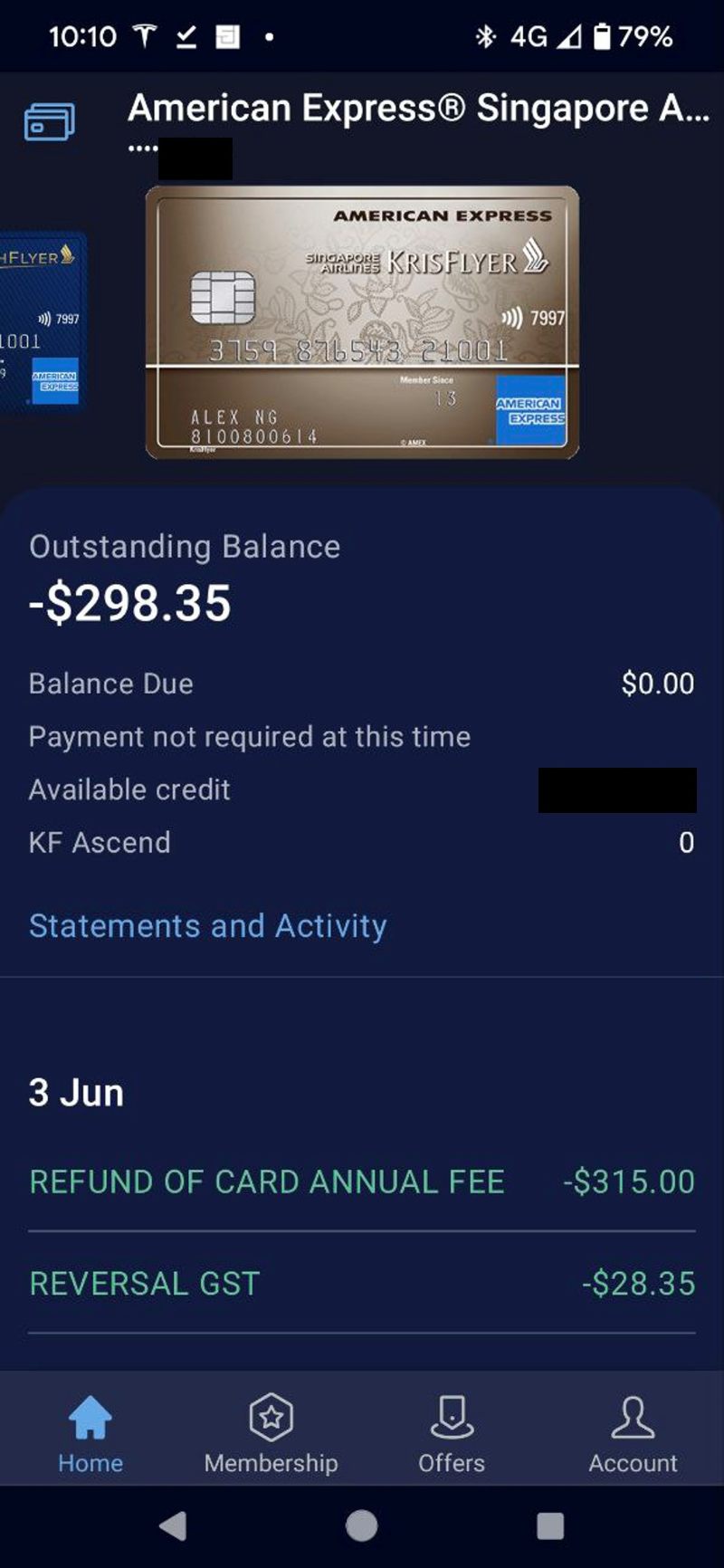
(4) Tap View Activity
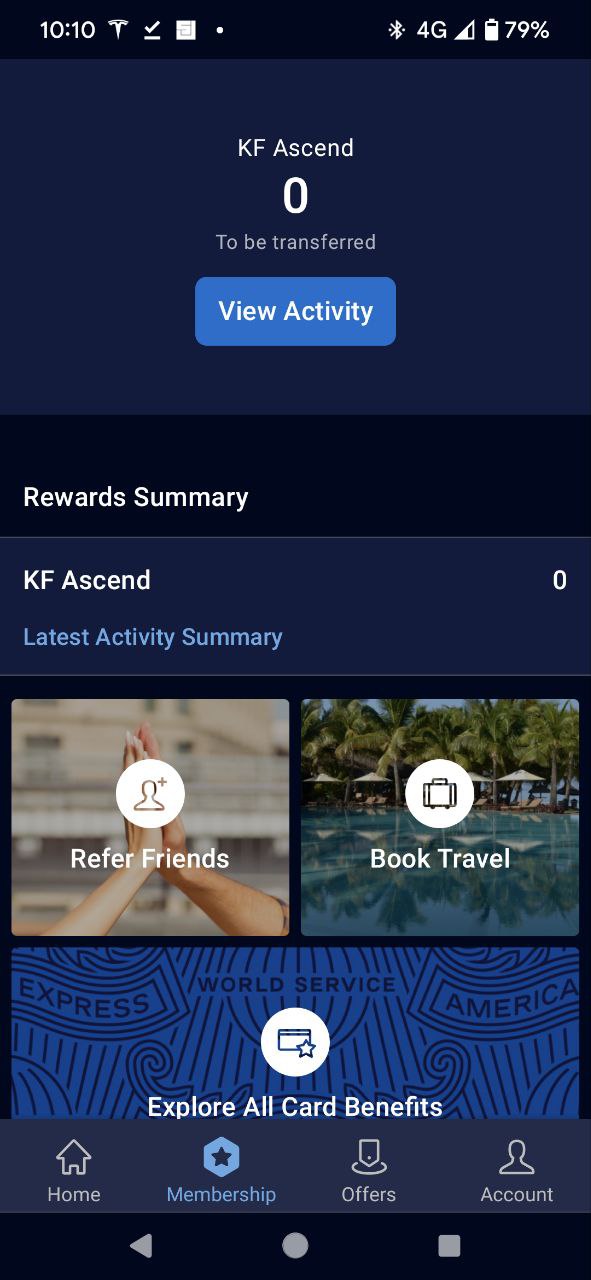
(5) You’ll see a breakdown of points earned in the previous statement period (you can’t go back further than that, sadly).
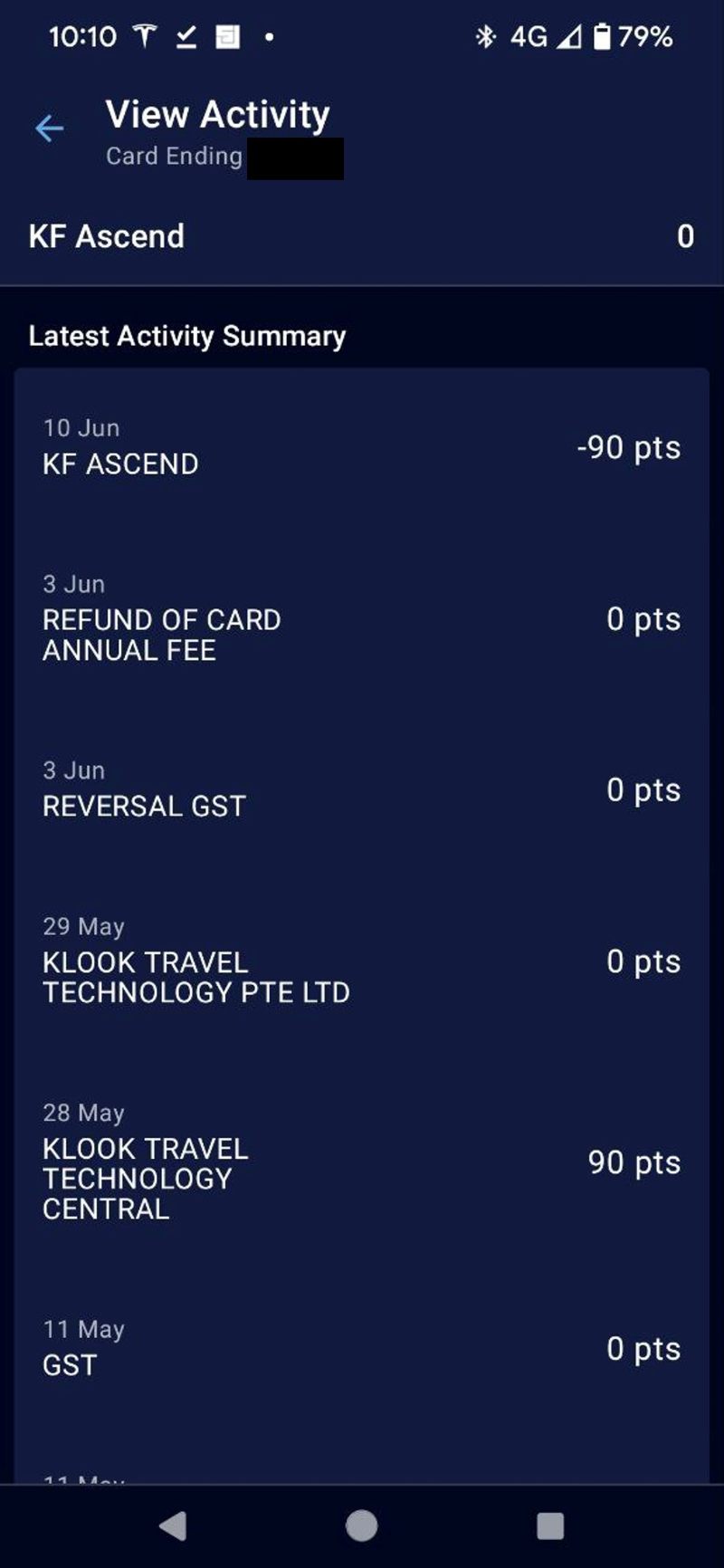
Unfortunately, this interface only shows you the points, and not the transaction amount. This makes reconciliation more troublesome, though not impossible if you compare it side-by-side with the desktop transaction statement.
DBS
(1) Log in to your DBS account
(2) Click the Virtual Assistant icon at the bottom right hand corner (if it doesn’t respond, disable your ad blocker)
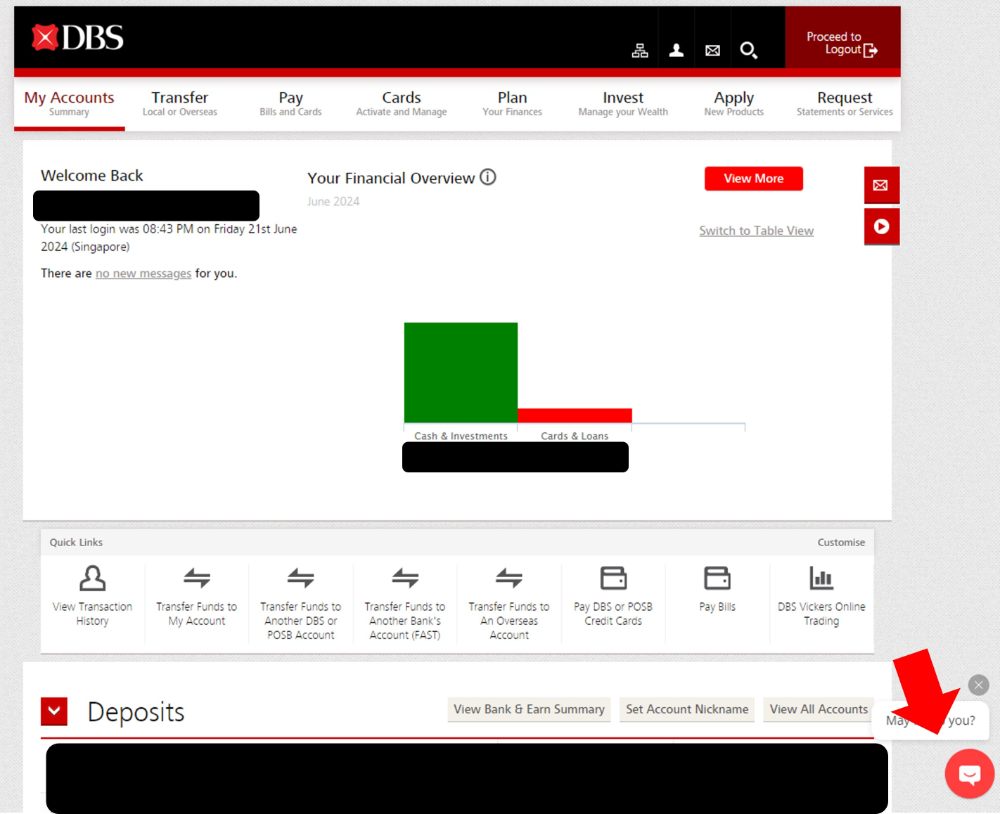
(3) Type “Rewards Enquiry” > Check via DBS digibot > Points per Transaction
(4) You will now see the points awarded per transaction. Click on “See More” to populate additional entries

For bonus points, look for a consolidated entry labelled “Ecom” (e-commerce). This is a lump sum figure, so you will need to disaggregate it manually.
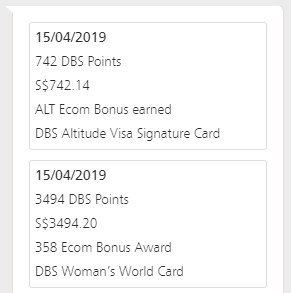
Do note that not every customer will see the “Ecom” entry, even if they have eligible bonus transactions (it has never appeared for me). In that case, you’ll have to call up customer service to check your bonus points.
HSBC
(1) Log in to the HSBC mobile app
(2) Tap on the card you wish to check points for > View More > Redeem Your Points
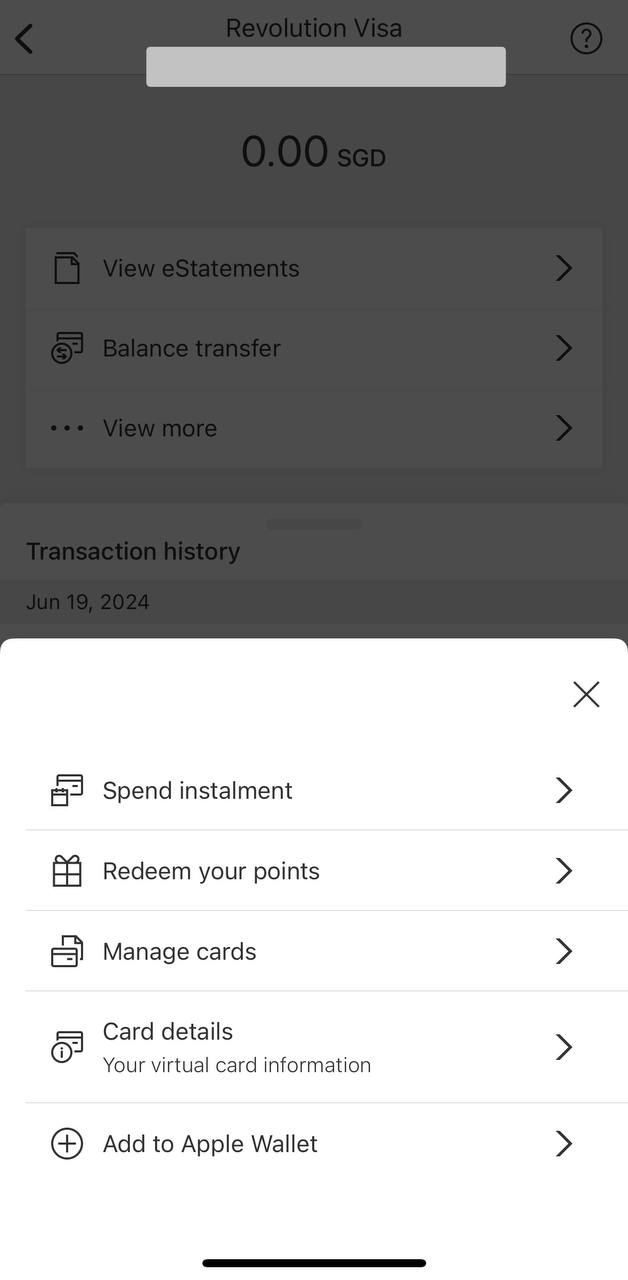
(3) Tap on Show Points History
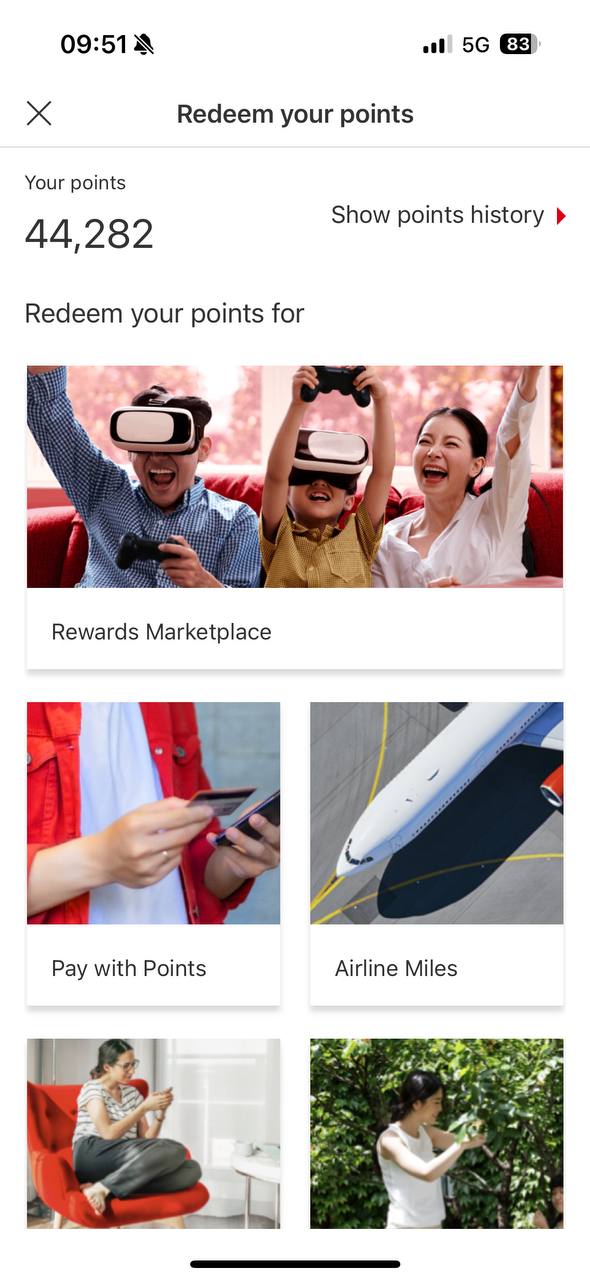
(4) You can then view the points awarded per transaction. Do note that this screen will show points earned from all cards, not just the card you selected in step (2). Don’t worry; the last four digits of each card is shown, so you’ll know where each set of points came from.
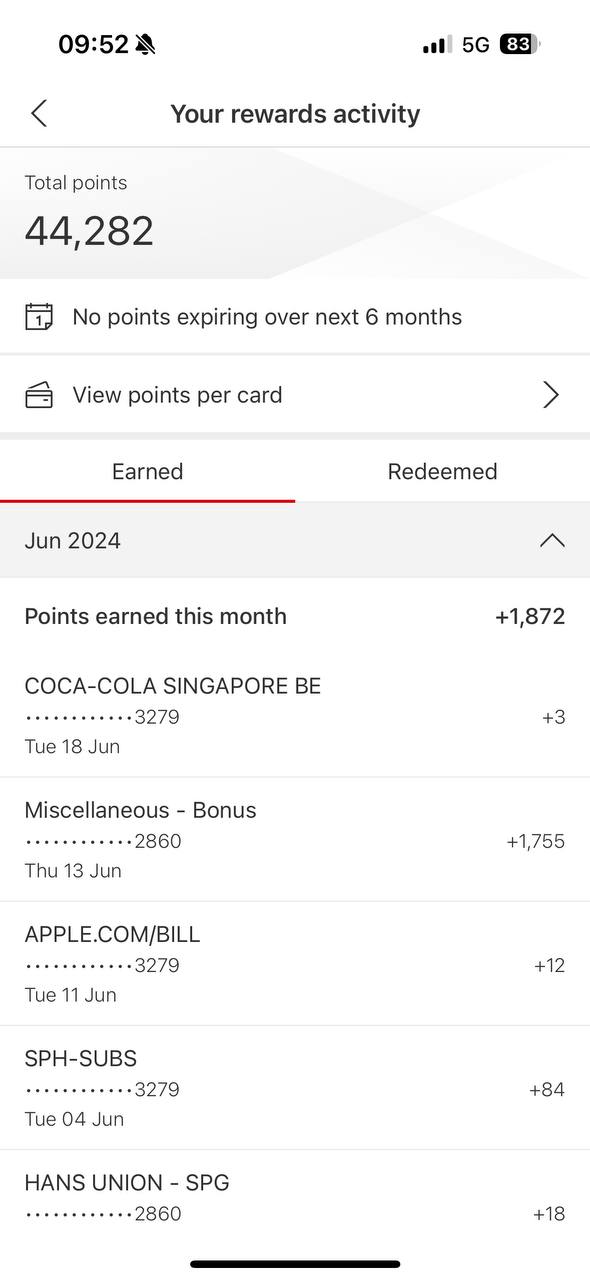
Bonus points from the HSBC Revolution will be credited in one lump sum tagged as “Miscellaneous- Bonus”, posted the following month after transactions were made.
OCBC
(1) Log in to the OCBC app
(2) Tap on Rewards and select the relevant balance (90°N Miles, OCBC$ or VOYAGE Miles, as the case may be)

(3) You will be taken to the rewards history screen. Tap on any transaction you want to learn more about.

Frankly, this is of limited usefulness. OCBC uses reference numbers rather than merchant names for tracking, so it’s far from intuitive. Moreover, it does not show any entry for the crediting of bonus points.
Standard Chartered
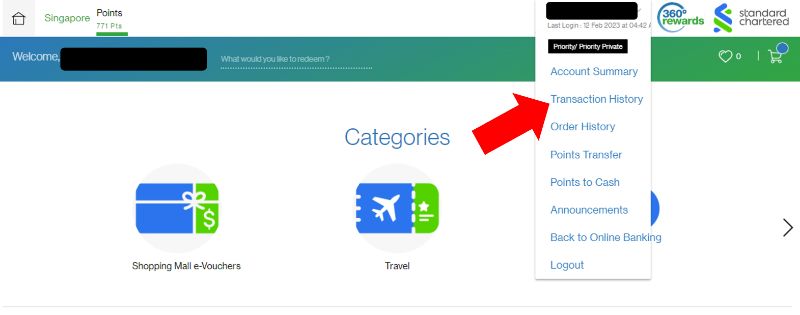
(1) Log in to your Standard Chartered account
(2) Click on your name on the top right, then “Transaction History”
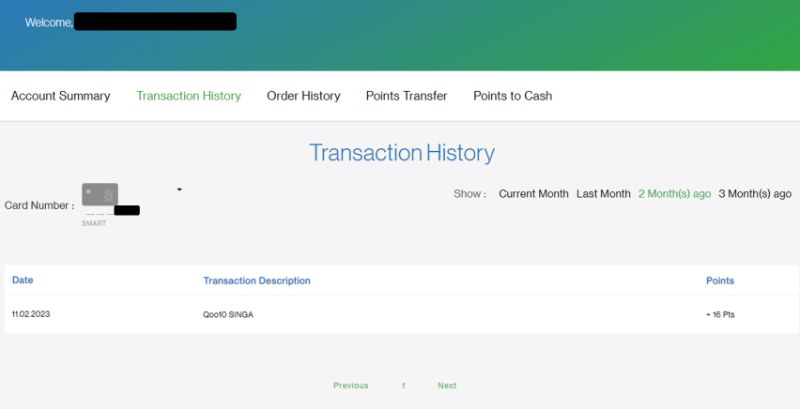
(3) Choose which card you want to see a breakdown for. Points breakdowns can be viewed for up to three months.
UOB
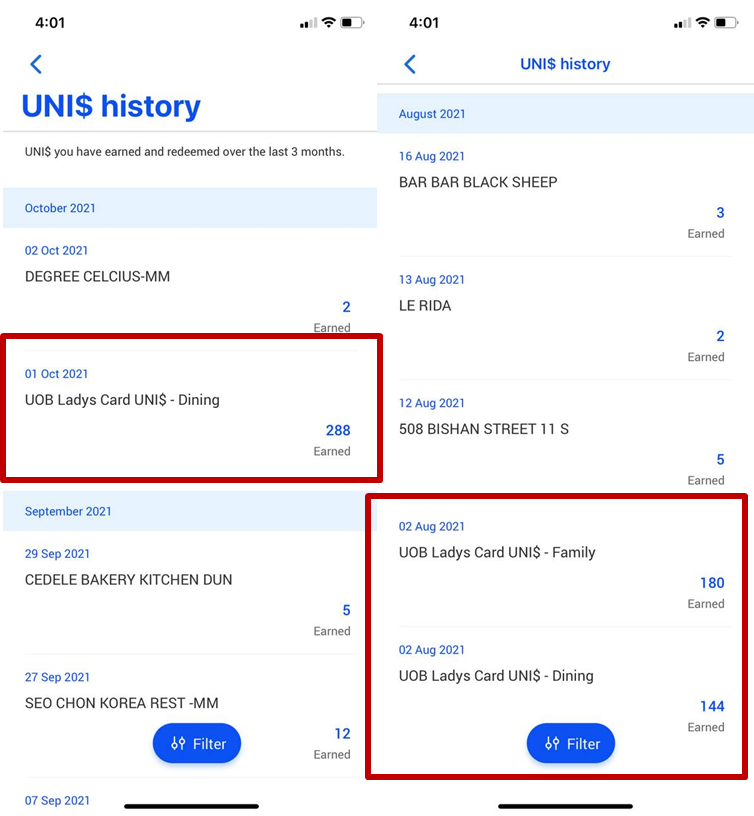
(1) Log in to the UOB TMRW app and tap Rewards+ > My Rewards > UNI$
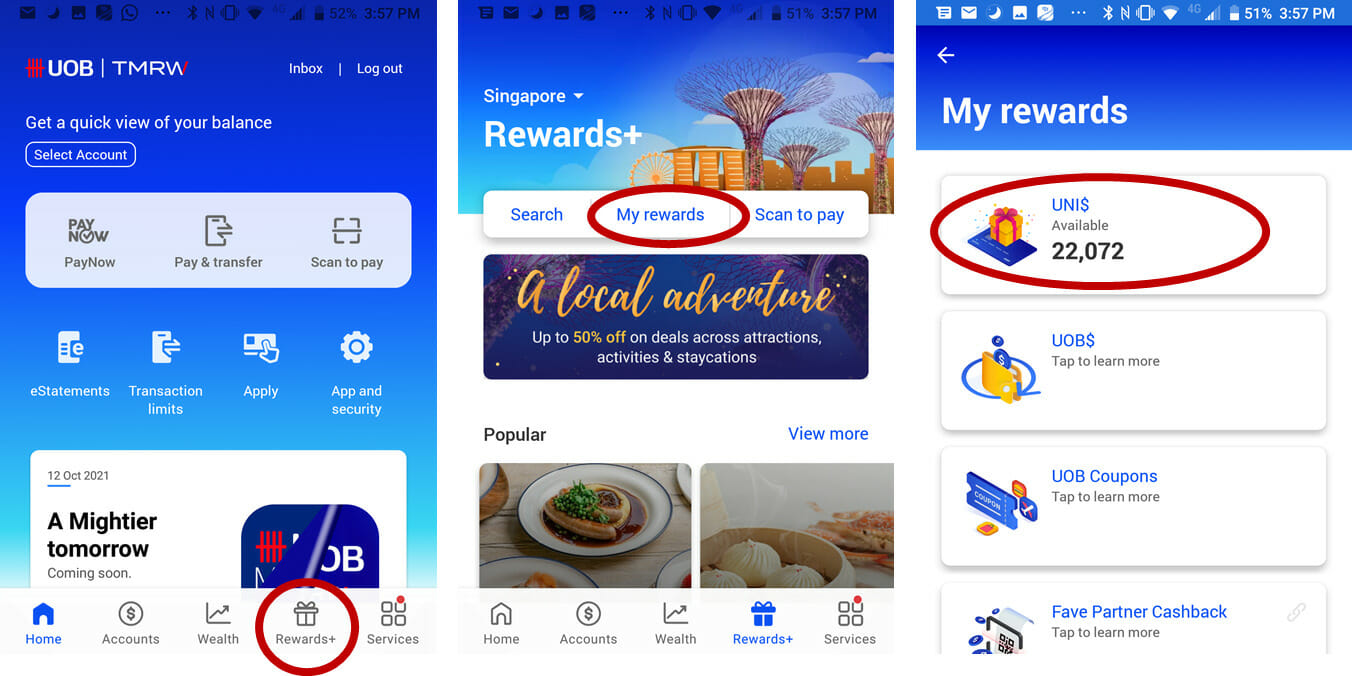
(2) You’ll see a breakdown under the UNI$ history section (tap “view all” to see more), for the past three months.
If you spend using the UOB Preferred Platinum Visa, you’ll see a transaction-level bonus entry.
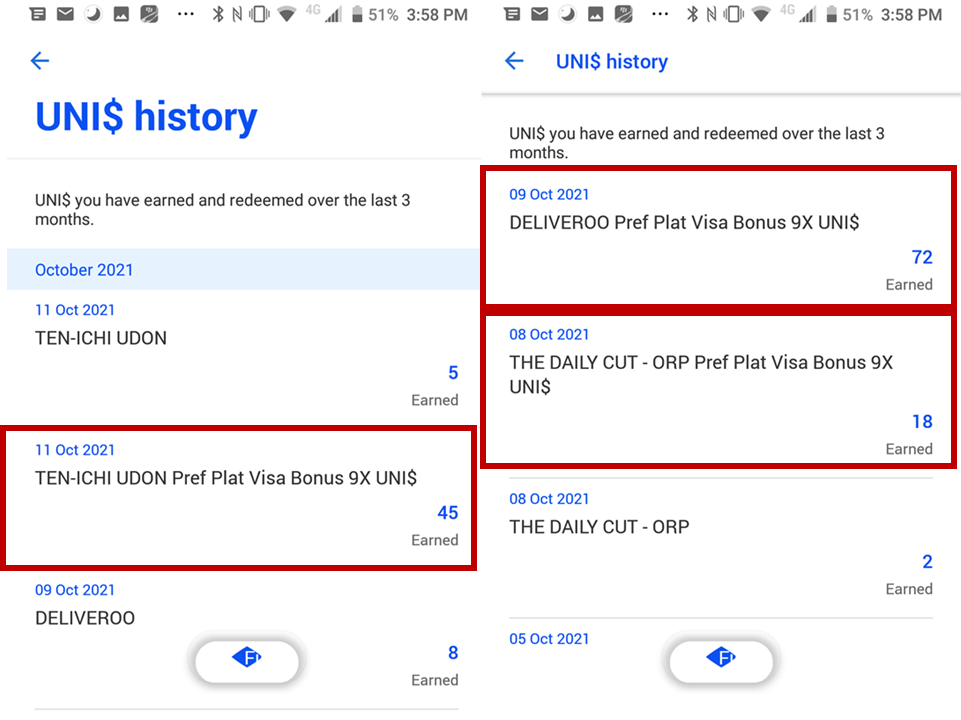
If you use the UOB Lady’s Card, UOB Lady’s Solitaire or UOB Visa Signature, you’ll see a consolidated monthly bonus entry at the start of each month.
Conclusion
It’s an open question as to how closely you should monitor your points. Some believe it’s enough to give it a cursory glance each month, others track it obsessively with hyper-detailed spreadsheets. Regardless of which camp you fall into, I think we can all agree that more granular information is better than aggregated lump sums!
If you have an American Express, DBS, HSBC, OCBC, Standard Chartered or UOB card, you can track the points per transaction with some degree of accuracy.
My hope is that Citibank, Maybank and Bank of China (hahahahahaha) will make it easier for customers to track points in the future, which would save a lot of CSO bandwidth.

I love you and your guides.
Mainly your guides
that’s good enough for me.
probably at least 4 banks also love you for saving them a significant number of CSO hours.. the Citi CSO I spoke to for far too long on this topic couldn’t answer my question of how to do this. Thanks Aaron.
Call UOB last mth with regards to missing points. CSO went through every single transaction with me, tally the points and true enough there was insufficient points.
SCO put up a remark for me, till date am still waiting for someone to get in touch with me.
Not sure why UOB doesn’t do what other banks did. I really pity their SCO.
no incentive to invest in the sort of IT infrastructure needed to make it possible.
ocbc premier banking leh… and very interested in WHAT DID YOU BUY @ qoo100 with amex card
https://www.qoo10.sg/amex
Thank you for the step by step with screenshots. Amex is easy for me to see. Didn’t know DBS could see until your post.
Wow! Bless YOU!
Hmm, think I can’t check for AMEX KrisFlyer Ascend? Hope we can trust their miles award systems …
Yup, Krisflyer Ascend shows you a page saying option not available for the card.
I can’t see my WWMC 9X postings on the digitbot even though they are credited. I suspect it may be due to me getting a replacement card previously
Yes, I’m in the same situation as you
For me that digibot 9x posting also disappeared since I got a replacement card!
krisflyer amex doesnt work this way .. think because the point to direct to the krisflyer.
OCBC titanium only manage find the 1x, not sure how to find the 9x, click thru every transaction and cant see sia
O/T – had an email from PPS club giving up to 15% bonus on bank point transfers:
Earn 12% bonus miles when you convert between 10,000 and 49,999 KrisFlyer miles in a single qualifying transaction.
OR
Earn 15% bonus miles when you convert 50,000 KrisFlyer miles or more in a single qualifying transaction.
For UOB Visa Signature, how do you see the bonus points? Does it appear on the app? I don’t seem to see any at all, which is strange.
Are you able to see on the online banking website, or only the app?
Thanks for your advice
Follow on question: I can’t view the bonus points on the DBS website.
I called the customer service hotline, but they are unable to confirm how many bonus point. Any way to check on whether a transaction was credited? I need to check the use of the Amaze card paired with this.
Thanks so much!
Is it possible that DBS has recently changed the approach to check the individual points credited? Following the explained path above, I am not anymore able to see a breakdown (since about 2 months).
Small typo in between the UNI$ screenshots – UOB Lady’s Solitaire, not Solitiare
Thanks!
Thanks for this wonderful guide!! But just wondering how come I don’t see points for simplygo transactions on DBS (i’m using DBS altitude and each transaction is more than $1.54)
Any advice on chasing banks that don’t credit points due? I completed a hotel stay booked and prepaid via Citi’s Agoda portal back in July. The 90 day window for crediting the bonus has come and gone, and all Citi has done is ‘escalate it to the relevant’ team’ upon each followup.
The Citi ThankYou portal is no longer available for Citi Rewards, and we’re directed to use the Citi app instead. However the Citi app does not show points awarded per transaction. Any idea what’s the latest method we can use to track our points on the transaction-level?
Hi Aaron, for Citi, review reward balances only show the accumulated balances, there’s no way to get to points summary for detailed points breakdown unfortunately.
I just realised HSBC showed points earned history in their app. However, it only shows the 1X points breakdown while the bonus 9x points is lumpsum. Can only check from May 2024 onwards. Better than nothing though.
For OCBC, there is no way to check the ‘Bonus 9X points: Posts the following calendar month in a lump sum’ right?
Only way is just to monitor the total points prior to X9 points being credited?
I called up the CSO regarding the Uob ladys saving account and why didn’t my UNI$ show the bonus that I should get from putting money in the savings account. CSO checked and said the bonus UNI$ from putting money in the bank account for me will only show on the 27th of the FOLLOWING month for the prior month’s transactions. His explanation is that the banking statement vs CC statement cut off is different. I don’t recall reading that or my memory is poor) so I said ok, I will wait for the 27th and see if the bonus… Read more »
Yes that is correct. Uob lady savings bonus points come at end of month. Will add a note
Citi now can’t even check points expiry. And Citi CSO hopeless. Now need to manually track points, bonus points and points expiry. Well done Citi.
Hi there, is there any way to check the miles eared with a UOB Krisflyer Credit Card?
The only way I’ve found is to go to Krisflyer App and see miles accrued after it has been credited. It appears as a lump sum though, not at transaction-level (would love to know if txn-level is possible too).
Have spent the past 60 minutes arguing with the customer servicr team – I can not believe that a detailed, transaction level statement is not possible. I’ve been advised that a custom transaction doc will take 2 weeks. This totally screams SCAM!
Hi Aaron,
For UOB Lady’s you can check through the app on UOB insights. It categorises all payments by the bonus categories for the previous 5 months. So you can see how the MCC is recognised. It works for other UOB cards as well and you can view by card or by all accounts.
I just noticed this when it showed me how this month’s spend compared to previous months. I am not sure if you can only view after month end.